Student Loan Payoff Planner
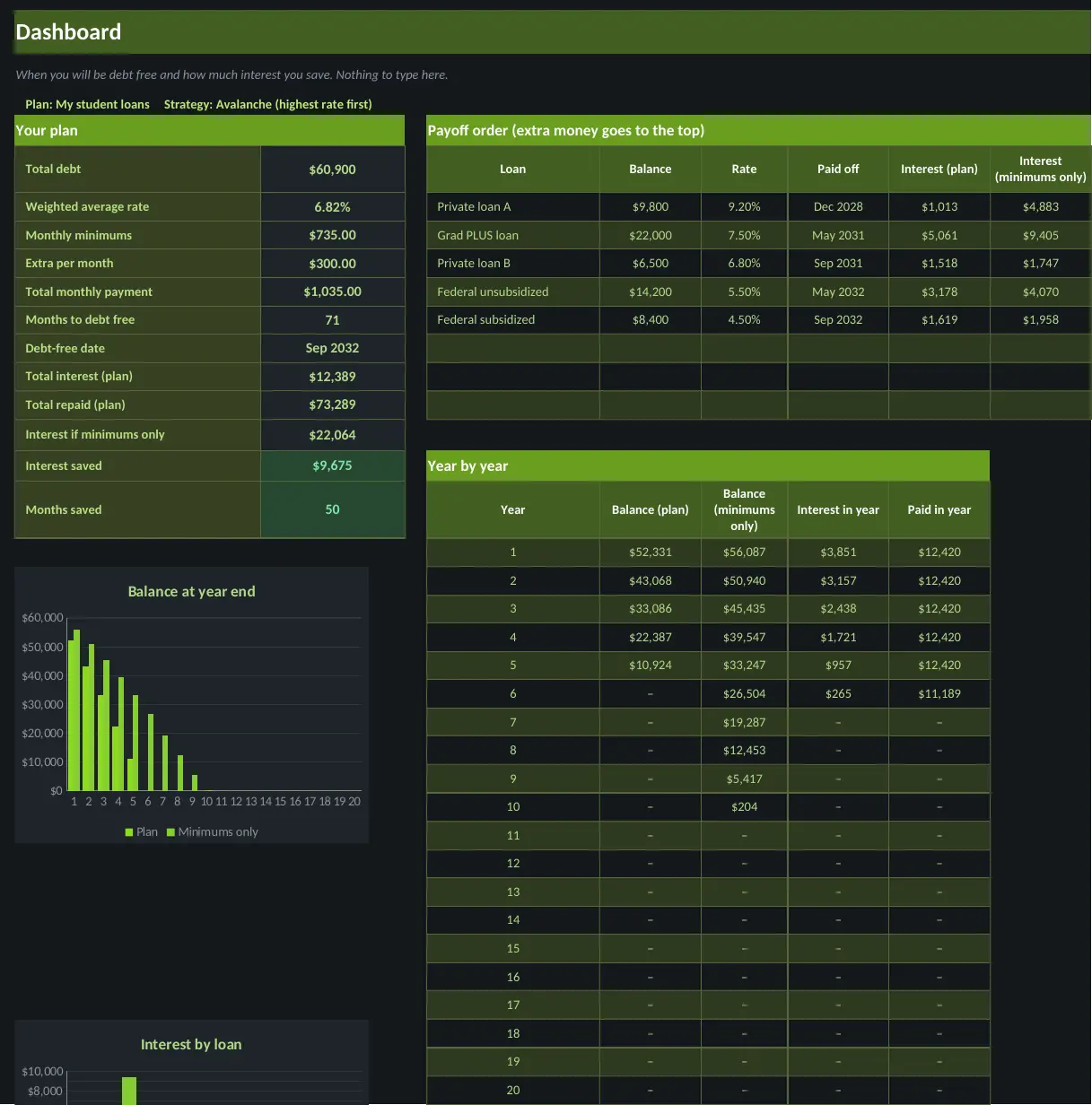
See your debt-free date, compare paying the minimum with paying extra, and watch interest savings add up.
What is inside
- Up to 8 loans with balances, rates and minimums
- Extra payment goes to the loan you choose first
- Debt-free date compared with minimums only
- Interest saved by paying extra
Sheets in the workbook
- Start Here
- Dashboard
- Settings
- Loans
- Schedule
A look inside
Screenshots use the sample-filled copy. Your download also includes a blank copy.


A planning tool, not financial or tax advice.
Questions
What do I get?
An instant download with the workbook in light and dark versions, a sample-filled copy so you can see it working, and a how-to guide. You pay once and there is no subscription.
Which apps does it work in?
Every template works in both Microsoft Excel and Google Sheets. To use one in Google Sheets, upload the file to Google Drive and open it with Sheets.
How do I get the file?
Right after checkout you land on a download page, and the same link is emailed to you.
Can I get a refund?
Digital downloads are all sales final once delivered. If a file is broken or missing, email us and we will replace it. See the Refund Policy.